
Utilities · version 1.2.1-1
strata
Strata is a keyboard-first file manager for modern Linux desktops, built with GTK4 and designed to fit Omarchy-style setups. It offers three ways to browse…
Project screenshots
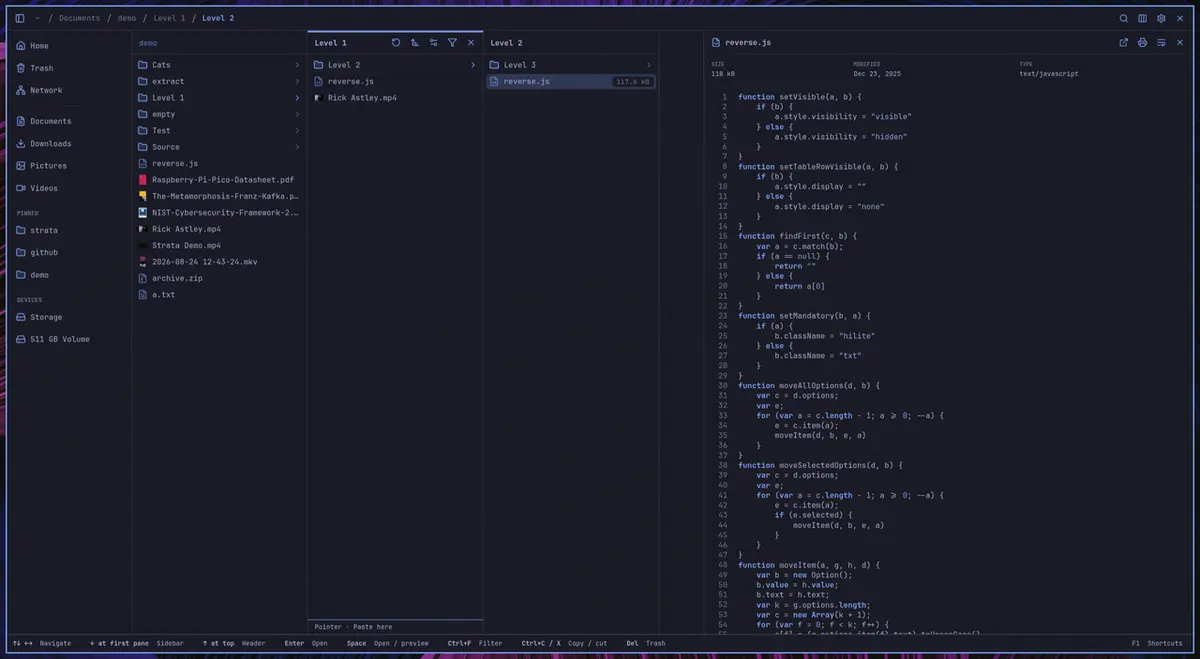
Loaded from the upstream project · View upstream source ↗
What is strata?
Strata is a keyboard-first file manager for modern Linux desktops, built with GTK4 and designed to fit Omarchy-style setups. It offers three ways to browse, macOS-style Miller columns for spatial navigation, a thumbnail grid, and a sortable table view, along with instant fuzzy filename search, rich file previews, and sandboxed preview rendering for security.
Install strata on Omarchy
$ omarchy pkg add strataGood to know
- GTK 4.12 or newer and a 64-bit Linux system with glibc 2.39+
Package details
- Pricing
- free-libre
- Licence
- MIT
- Download
- 20.8 MB
- Installed
- 49.6 MB
- Depends on
- bash, bubblewrap, cairo, ffmpeg, ffmpegthumbnailer, fontconfig, gcc-libs, gdk-pixbuf2, glib2, glibc, graphene, gst-libav, gst-plugins-good, gvfs, gtk4, gtksourceview5, hicolor-icon-theme, pango, poppler-glib, util-linux
Install Strata in one line
If you only read one thing: Strata is in the Omarchy package repository, so one command installs it and keeps it updated with the rest of your system.
omarchy pkg add strataOpen it from the app launcher (Super + Space, type Strata) or run strata in a terminal. The Strata page on this store shows the current version, size and source.
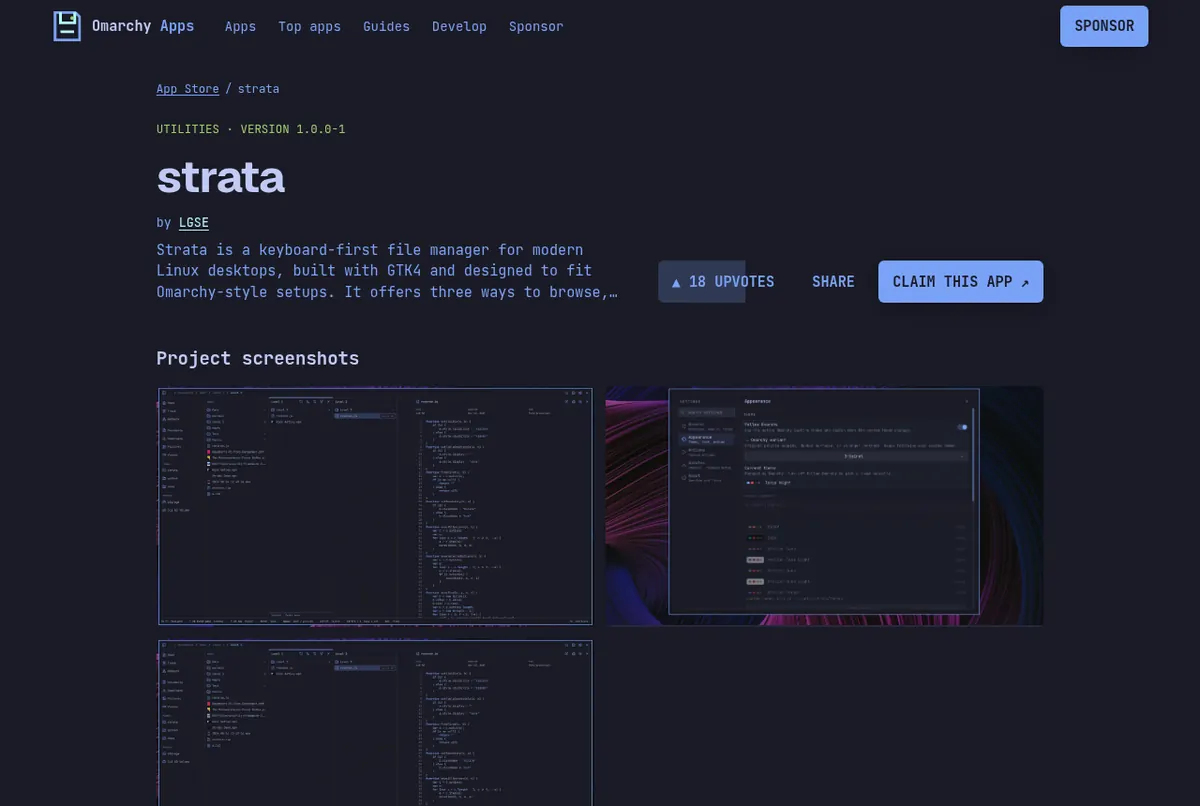
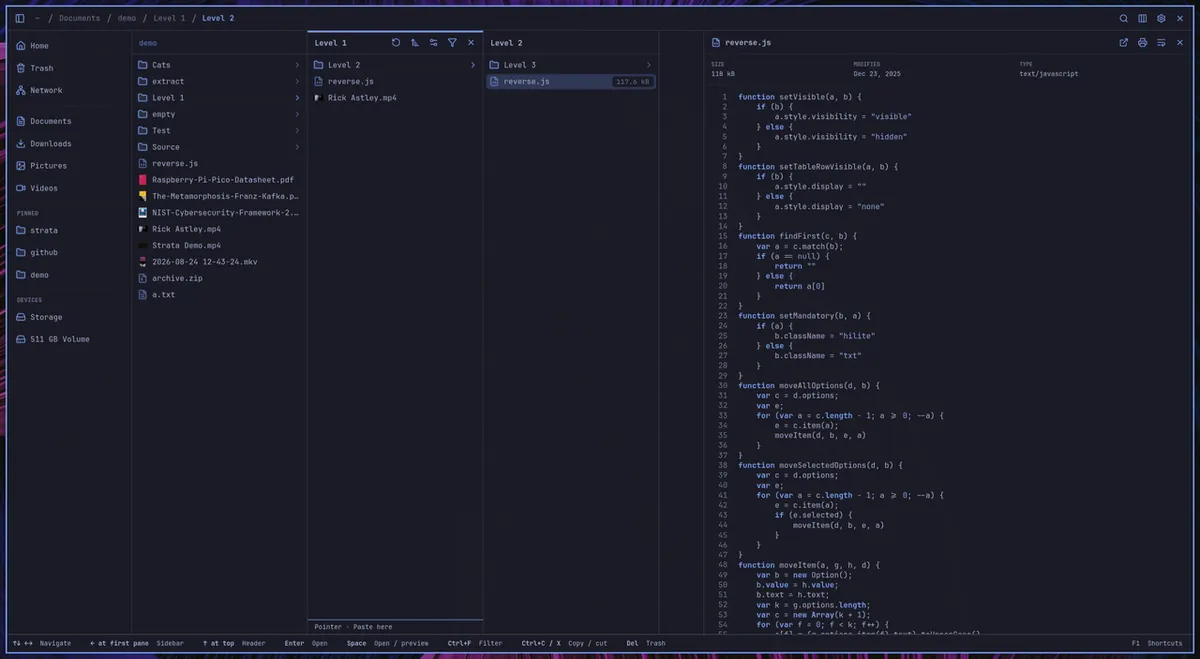
Screenshots: the Strata page on this store, and the Columns view from the lgse/strata README (MIT).
See it running
Video by DistroTester on YouTube. It loads from youtube-nocookie.com only after you press play.
The five keys worth learning first
These come from the default key map in the Strata README. Press F1 inside the app for the full reference.
| Key | What it does |
|---|---|
| Ctrl + K | Recursive search by file name or path across Home and mounted local drives |
| Ctrl + L | Type a path, or an address like smb://server/share or sftp://user@host/path |
| Ctrl + F | Filter the current pane |
| Space | Quick preview |
| F2 | Rename |
| Ctrl + Z | Undo the latest reversible file operation |
| Ctrl + Shift + M | Toggle 10xer mode with Yazi-style keys (q returns) |
Read next
Frequently asked questions
What is Strata?
Strata is a keyboard-first file manager for modern Linux desktops, made by LGSE. It has three views: navigable Miller columns, an icon grid and a sortable list. It adds fast filename search, rich previews and Omarchy theme following.
Is Strata free and open source?
Yes. The LICENSE file in the lgse/strata repository is MIT, and there is no paid tier. The project switched to MIT in September 2026, so older pages may still mention GPL-3.0-or-later.
How do I install Strata on Omarchy?
Run omarchy pkg add strata in a terminal. It comes from the Omarchy package repository and updates with the rest of your system. The project also has its own interactive installer for Arch Linux.
What does Strata need to run?
64-bit Linux with glibc 2.39 or newer and GTK 4.12 or newer. Release builds exist for x86_64 and aarch64. Arch Linux and Omarchy are the primary supported environments, and it is designed for Wayland.
How do I make Super+Shift+F open Strata instead of Nautilus?
On current Lua-based Omarchy releases, back up ~/.config/hypr/bindings.lua, then append overrides that unbind SUPER + SHIFT + F and bind it to launch strata. Run hyprctl reload and hyprctl configerrors to check. These user overrides survive Omarchy updates.
Does Strata search inside files?
No. Ctrl+K is fast filename and path search, not file-content search. The README calls this a deliberate tradeoff. By default each search walk stops at 10 seconds and 200,000 entries, and you can raise or remove those limits in Settings.
Why does a preview say Preview unavailable?
Image, RAW, PDF, thumbnail and media previews run in a separate Bubblewrap sandbox. If the sandbox is missing, a parser crashes or a limit is hit, Strata shows a normal icon or Preview unavailable instead of running the parser unprotected. Make sure bubblewrap is installed. Video thumbnails also need ffmpegthumbnailer or ffmpeg.
Is it safe to preview files I downloaded?
Strata treats files as untrusted. Native parsers run out of process with no network, no capabilities, a read-only runtime and resource limits. Plain text and source previews stay in process but are capped at 1 MiB.
Can Strata follow my Omarchy theme?
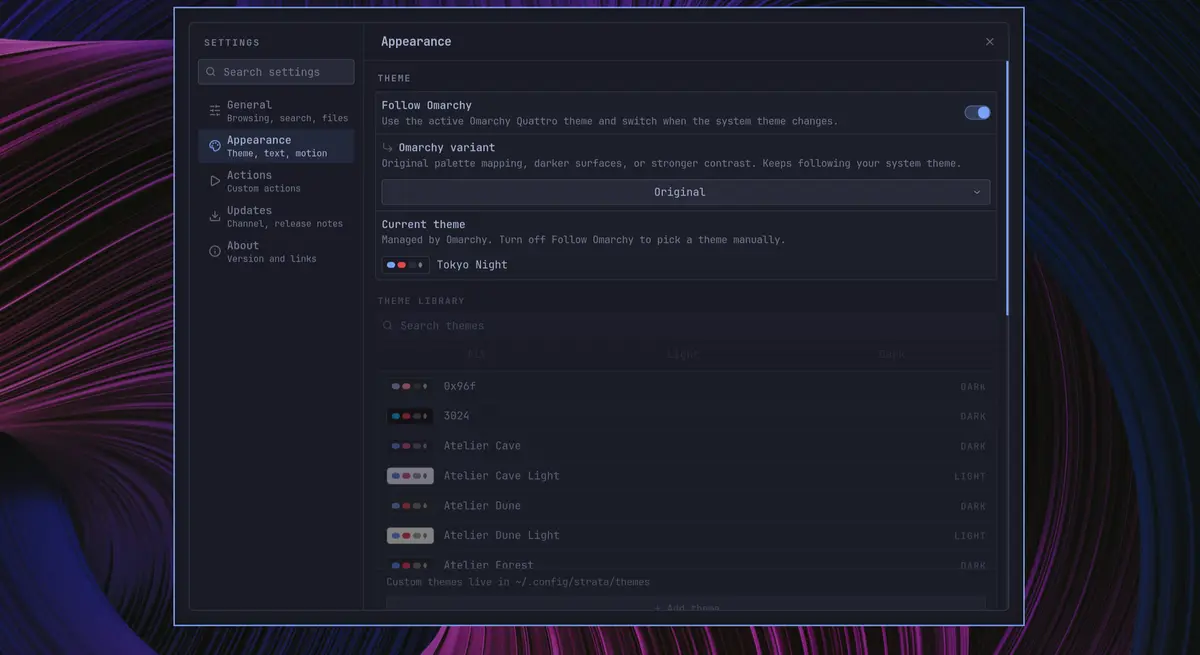
Yes, on Omarchy Quattro. Open Settings, then Appearance, and turn on Follow Omarchy. Strata then updates live when you change the Omarchy theme. You can also pick a bundled theme or build your own, saved as TOML in ~/.config/strata/themes/.
Can it open network shares?
Yes. Press Ctrl+L and enter an smb:// or sftp:// address. Strata uses GIO/GVfs and asks for credentials when needed. SMB needs the gvfs-smb backend on Arch.
How does Strata update?
It checks for updates by default and never downloads or installs one without your confirmation. If you installed it from the Omarchy package repository, it checks that repository. You can choose Stable, Preview or Nightly channels in Settings, then Updates.
Strata or flea?
Both are free, keyboard-first file managers listed on this store. Strata is Rust and GTK4 with Miller columns and sandboxed previews. flea is Rust with a Quickshell front end built for Omarchy. Our Strata install guide compares them side by side.
Sources
- lgse/strata on GitHub: README, features, technical specifications, preview sandbox
- Strata LICENSE file (MIT)
- stratafiles.io, the project site
- Strata listing on this store
Facts, prices and requirements checked against the sources above on October 19, 2026. Vendor prices can change. Store screenshots were taken from this site; project screenshots are credited to their repositories. An independent community project, not affiliated with or endorsed by Omacom or David Heinemeier Hansson. Built with David's blessing.
Strata on Omarchy: the keyboard-first file manager with Miller columns
Strata is a free, keyboard-first file manager for Linux (Rust + GTK4) — Finder-style Miller columns, instant fuzzy filename search, and rich previews that render inside a Bubblewrap sandbox so untrusted files can’t touch your system.
TL;DR install
omarchy pkg add strataLaunch it from your app launcher (or type strata in a terminal). You get three browse modes — navigable Miller columns, a thumbnail grid, and a sortable table — plus Ctrl+K fuzzy search that works while the tree is still being indexed.
Getting started in 5 minutes
1. Install and launch
Run the install command above, then launch Strata from the app launcher or a terminal. It opens on your home directory. On Omarchy, Strata follows your active Omarchy theme — if you use the Quattro theme, it follows that live (six bundled themes plus custom themes are also available in Settings).
2. The 3 things you need to know
- Miller columns navigation. The default Columns view works like macOS Finder: arrow keys move within a column,
→/ldescends into the selected folder (opening a new column),←/hgoes back up. Each column filters independently, and folders peek on hover. If columns feel weird, switch to the Icons grid or the sortable List table — the mode buttons are in the header. - Fuzzy search with
Ctrl+K. This is the killer feature. PressCtrl+Kanywhere and start typing a filename or path; results stream in while the tree is still being indexed. Global search covers Home and all mounted local drives, regardless of which folder you’re in. (Deliberate tradeoff, straight from the docs: this is fast filename/path search, not file-content search.) - Preview pane with
Space. Select a file and hitSpace(or just select it in Columns view) to get a bounded preview: source code with syntax highlighting, images, camera RAW, PDFs, audio with a now-playing view, video with a keyframe storyboard while scrubbing, and natively rendered Markdown/static HTML. Everything backed by a native parser runs in an isolated Bubblewrap sandbox, not in the app process — if something can’t be sandboxed, Strata shows “Preview unavailable” instead of risking it.
3. Config location
Strata keeps user preferences and custom themes under the XDG configuration directories (check ~/.config/strata after your first launch — early releases had no user config file at all). Current releases expose Settings → Updates (automatic update checks are on by default; turn them off there), Settings → Actions for custom context-menu scripts, and Settings → General for desktop integration options.
4. Make it your default file manager
In-app: Settings → General → Desktop integration sets Strata as the inode/directory handler and installs the FileManager1 D-Bus service, so “Reveal in File Manager” from other apps uses Strata. On Lua-based Omarchy, also rebind the stock Nautilus shortcuts (Super+Shift+F, Super+Alt+Shift+F) in ~/.config/hypr/bindings.lua per the upstream README, then hyprctl reload. These user overrides survive Omarchy updates.
5. Other useful shortcuts
Default map; press F1 for the full reference: Ctrl+L for path/URI entry (type smb://... for network shares), Ctrl+F to filter the current pane, Ctrl+Z / Ctrl+Shift+Z to undo/redo file operations, F2 to rename, Alt+arrows for history and parent navigation.
Common issues & fixes
Previews show “Preview unavailable” — Bubblewrap missing
Strata refuses to run image, RAW, PDF, thumbnail, or media parsers without a sandbox. From the README: “Bubblewrap is required: preview parsing fails closed rather than running untrusted native parsers without a sandbox.” So if bubblewrap isn’t installed, every parser-backed preview quietly degrades to “Preview unavailable” while the app otherwise works fine — which looks like a Strata bug but is really a missing dependency.
Fix: Install the runtime dependency set and restart Strata (bubblewrap fixes parser-backed previews; ffmpegthumbnailer/ffmpeg fix video thumbnails, which otherwise fall back to a generic icon):
sudo pacman -S --needed bubblewrap ffmpeg ffmpegthumbnailer fontconfig gst-libav gst-plugins-good gtk4 gtksourceview5 poppler-glibPhone photos (12MP+) fail to preview or thumbnail, possible core dump
Fix: Real reported issue (lgse/strata#54, fixed): the sandbox’s file-size limit mirrored the output cap, and since gdk-pixbuf decodes through glycin to width × height × channels, any image over roughly 11MP exceeded the limit and the loader was killed with SIGXFSZ. Update to a current release — the fix decoupled the sandbox file-size cap (now 512 MiB) from the output-byte cap. In-app: Settings → Updates, or reinstall the latest release.
Sony .ARW (and some other RAW) previews fail
Fix: Real reported issue (lgse/strata#165, fixed): the sandbox bind-mounted every file as extensionless /input, so ImageMagick treated Sony .ARW (a TIFF-container RAW) as plain TIFF and failed. Update to a current release; the fix keeps a sanitized original extension across the sandbox boundary. For broader camera RAW support also install sudo pacman -S --needed imagemagick libraw dcraw.
Animated GIF previews crash or hang
Fix: Real reported issue (lgse/strata#128): GIF playback hit a hardware-preview sandbox issue — FFmpeg’s retained output stream wasn’t bounded, and applying guessed memory limits to opaque GPU driver internals crashed the preview. Update to a release containing the bounded-media-streaming fix (lgse/strata#119): GIFs now play with bounded media streaming, hardware acceleration treated as best-effort with reliable software fallback.
Ctrl+K search doesn’t find files on network shares
Fix: Not a bug — a documented limitation. Global search covers Home and all mounted local drives; “URI-native remote shares are not yet included” (README). So smb:// and sftp:// locations (reachable via Ctrl+L) simply don’t appear in global search results. Navigate to the share first (Ctrl+L, enter the URI, authenticate), then use pane-scoped filtering (Ctrl+F) inside that location.
Pairs well with / If you hate this, try
Pairs well with
- Omarchy’s launcher for apps,
yaziorrangerfor the times you’re already in the shell, andudiskiefor encrypted-volume unlock — Strata can take over udiskie’s unlock dialog on Omarchy 3/4 via Settings → General → Desktop integration.
If you hate this, try
- flea (thisisgm/flea) — same keyboard-first idea, but a Quickshell front end instead of GTK4, built Omarchy-first. Or stick with Nautilus if you don’t care about keyboard-first. If Miller columns are the thing you hate, Thunar gives you a classic tree+list layout with near-zero overhead.
Comparison: Strata vs flea vs Nautilus vs Thunar
| Strata | flea | Nautilus | Thunar | |
|---|---|---|---|---|
| Price | Free (MIT) | Free | Free (GNOME) | Free (Xfce) |
| Best for | Keyboard-first Finder-style browsing: Miller columns, fuzzy search, rich sandboxed previews, live Omarchy theme following | Omarchy-native speed: Rust backend + Quickshell UI that follows your Omarchy theme, Mac/Vim/Windows key presets | Default GNOME workflow; Omarchy’s stock file manager, zero setup | Minimal, fast, low-resource classic file management (tree + list) |
| Omarchy install | omarchy pkg add strata | omarchy pkg add flea (or omarchy pkg aur add flea-bin for fastest updates) | Pre-installed | omarchy pkg add thunar |
One-line verdict: Both are free and keyboard-first — but they’re different philosophies. Strata is the GTK4 route: Finder-style Miller columns, the deepest preview engine of the bunch (parsers sandboxed via Bubblewrap), live theme following. flea is the Omarchy-native route: Rust backend + Quickshell front end, built for Omarchy from day one, leaning into speed and theme integration. Columns and previews → Strata; Omarchy-native speed → flea.
Open the Strata package
See the live version, upstream screenshot, requirements, source and exact Omarchy install command.
Frequently asked questions
Does Strata work on Omarchy?
Yes — Arch Linux and Omarchy are the project’s primary supported environments, and Strata is explicitly “designed for Omarchy.” Requirements: glibc 2.39+ and GTK 4.12+. It follows the active Omarchy theme live (including Quattro), and the README documents Hyprland keybind overrides, udiskie encrypted-volume unlock, and SMB support via gvfs-smb.
Is Strata free?
Yes. MIT-licensed, free and libre — no paid tiers, no feature gates. In-app updates are built in (on by default; disable in Settings → Updates).
Strata vs flea?
Both keyboard-first, both free, both on omarchyapps.com. Strata = Rust + GTK4, Miller columns, the richest preview engine, sandboxed parsers. flea = Rust + Quickshell, built Omarchy-first, leans into raw speed and native theme integration. Same price (zero). Columns and previews → Strata; Omarchy-native speedster → flea.
Why do some previews show “Preview unavailable”?
Almost always a missing sandbox dependency, not a Strata bug. Parser-backed previews require bubblewrap; video thumbnails need ffmpegthumbnailer/ffmpeg. Install the full runtime set (see the first issue above) and restart Strata. Strata fails closed by design — it will never run an untrusted parser unsandboxed just to show a thumbnail.
Can Strata replace Nautilus as my default file manager?
Yes, two layers: Settings → General → Desktop integration sets Strata as the inode/directory handler and installs the FileManager1 D-Bus service. Then, on Lua-based Omarchy releases, override the stock Nautilus shortcuts (Super+Shift+F, Super+Alt+Shift+F) in ~/.config/hypr/bindings.lua — those user overrides survive Omarchy updates.
Official sources
- lgse/strata — official repo & docs (features, install, Omarchy keybind integration, preview sandbox, dependencies)
- lgse/strata#55 — phone-photo preview fix (issue #54)
- lgse/strata#166 — Sony .ARW RAW preview fix (issue #165)
- lgse/strata#128 — GIF preview sandbox crash / #119 — fix
- thisisgm/flea — comparison
- omarchy-supplement WARP.md — Strata runtime deps, MIME handler setup
Commands and fixes verified against official sources October 2026; on-machine verification pending.
What Strata is, in one paragraph
Strata is a file manager for Linux made by LGSE. Its tagline is Navigate every layer. You browse in three ways: Miller columns like the Finder column view, an icon grid, or a sortable list. You find things with Ctrl + K, a search that starts showing results while it is still indexing. You look inside files with previews for Markdown, HTML, code, images, camera RAW, PDF, audio and video. It is written in Rust with GTK4, and the README says it is designed for Omarchy.
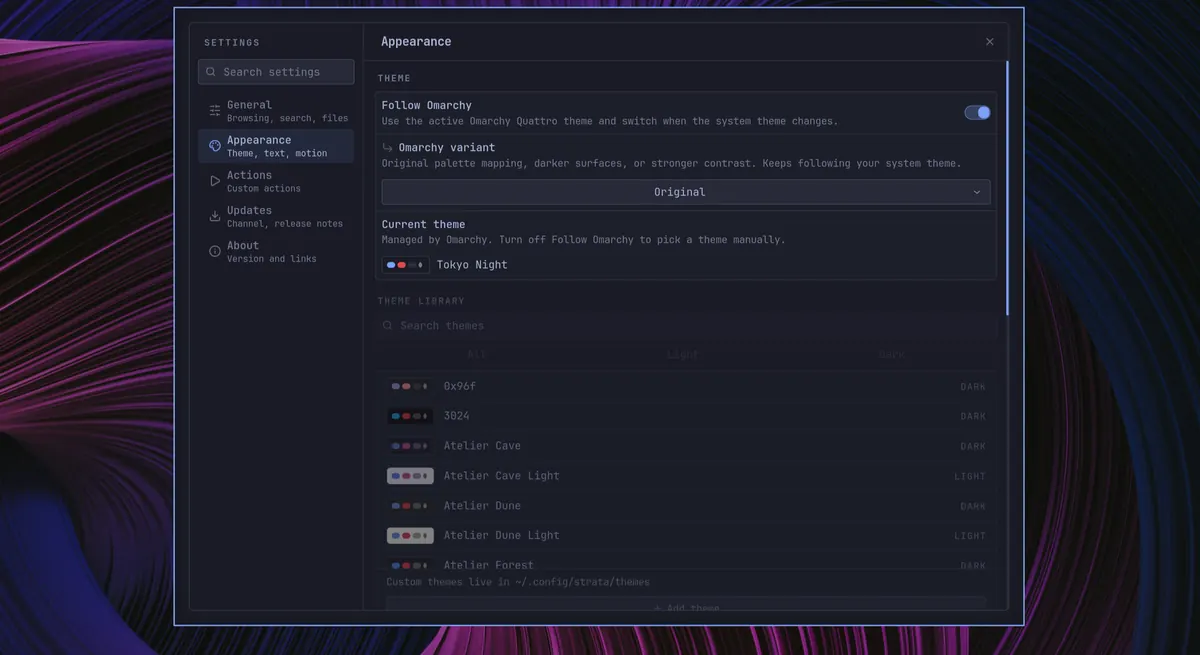
Screenshots: Appearance settings from the lgse/strata README (MIT), and the Strata page on this store.
Is Strata open source?
Yes. The LICENSE file in the lgse/strata repository is the MIT License, and the store listing marks it free-libre. There is no paid tier. The project moved to MIT in September 2026, so you may still see GPL-3.0-or-later on older pages.
One detail for packagers: by default the build embeds RARLAB's UnRAR code, which is not free software. The README documents a build flag that leaves it out.
Strata vs the paid tools people switch from
People coming from a Mac or a Windows PC often paid for a power file manager. These are the popular ones. Prices come from each vendor's own store page, checked on October 19, 2026. They are vendor prices, not ours, and they can change.
| Strata | ForkLift 4 | Total Commander | Directory Opus 13 | |
|---|---|---|---|---|
| Runs on | Linux (Omarchy and Arch first) | macOS | Windows (mobile versions are free) | Windows 7 to 11, x64 |
| Price | Free | From $19.95 single user, lifetime license with 1 year of updates | EUR 42 plus VAT where it applies, after a 30-day trial | Paid licence, priced in AUD on the vendor site, 30-day free trial |
| Source code | Open, MIT | Closed | Closed (shareware) | Closed |
| Layout | Miller columns, icons, list | Dual pane | Two file windows side by side | Dual panes, dual trees, tabs |
| Search | Fast filename and path search, Ctrl + K | Name, kind, tags or content | Enhanced search | Built in, can use Windows Search or Everything |
| Remote | SMB, SFTP via GVfs | SFTP, FTP, WebDAV, S3, SMB and more | FTP client with FTPS | FTP |
| Previews | Rich previews in a Bubblewrap sandbox | Preview panel | Quick View panel | Integrated viewer |
Where the paid tools are ahead: ForkLift, Total Commander and Directory Opus are dual-pane managers with built-in sync and batch tools. Strata's own site says it has no independent split panes or file-content search yet, and that batch renaming works through custom actions. Those are real reasons to keep a two-pane tool. If you live in two panes, try flea too, or keep the paid tool on the machine you already own.
Try Strata on Omarchy
omarchy pkg add strataThen press Ctrl + K and search for something you know you have. To make it your default, the Strata FAQ has the keybinding override for Super + Shift + F.
Video by Ramble PDSN on YouTube. It loads from youtube-nocookie.com only after you press play.
Open the Strata package
Current version, size, license and the exact install command.
Read next
Frequently asked questions
Is Strata open source?
Yes. The Strata repository on GitHub is MIT licensed and there is no paid tier. Its default build embeds RARLAB's non-free UnRAR code, which packagers can leave out with a build flag.
Is Strata a ForkLift alternative?
For Linux, yes in spirit. ForkLift 4 is a paid macOS app, starting at $19.95 for a single user with one year of updates. Strata is free and runs on Linux. ForkLift has dual panes and many cloud connections; Strata focuses on Miller columns, search and previews.
Is there a Total Commander or Directory Opus for Linux?
Neither vendor lists a Linux desktop version on its site. Total Commander is Windows shareware at EUR 42 plus VAT after a 30-day trial, and Directory Opus supports x64 Windows 7 to 11. On Omarchy, Strata and flea are free keyboard-first options.
Does Strata have dual panes?
Not as independent split panes. The project site says so in its comparison table. Multiple Miller-column panes keep parent folders in view, but it is not a two-pane commander layout.
What do I need to run Strata?
64-bit Linux with glibc 2.39 or newer and GTK 4.12 or newer, on x86_64 or aarch64. On Omarchy, install it with omarchy pkg add strata.
Sources
- lgse/strata README and LICENSE
- stratafiles.io comparison table
- ForkLift 4 store page (binarynights.com)
- Total Commander order page (ghisler.com)
- Directory Opus site (gpsoft.com.au)
Facts, prices and requirements checked against the sources above on October 19, 2026. Vendor prices can change. Store screenshots were taken from this site; project screenshots are credited to their repositories. An independent community project, not affiliated with or endorsed by Omacom or David Heinemeier Hansson. Built with David's blessing.